Student Project · UX Research & Design · Aug – Dec 2024
Orbit: As AI Does More,
Trust Must Be Earned Differently
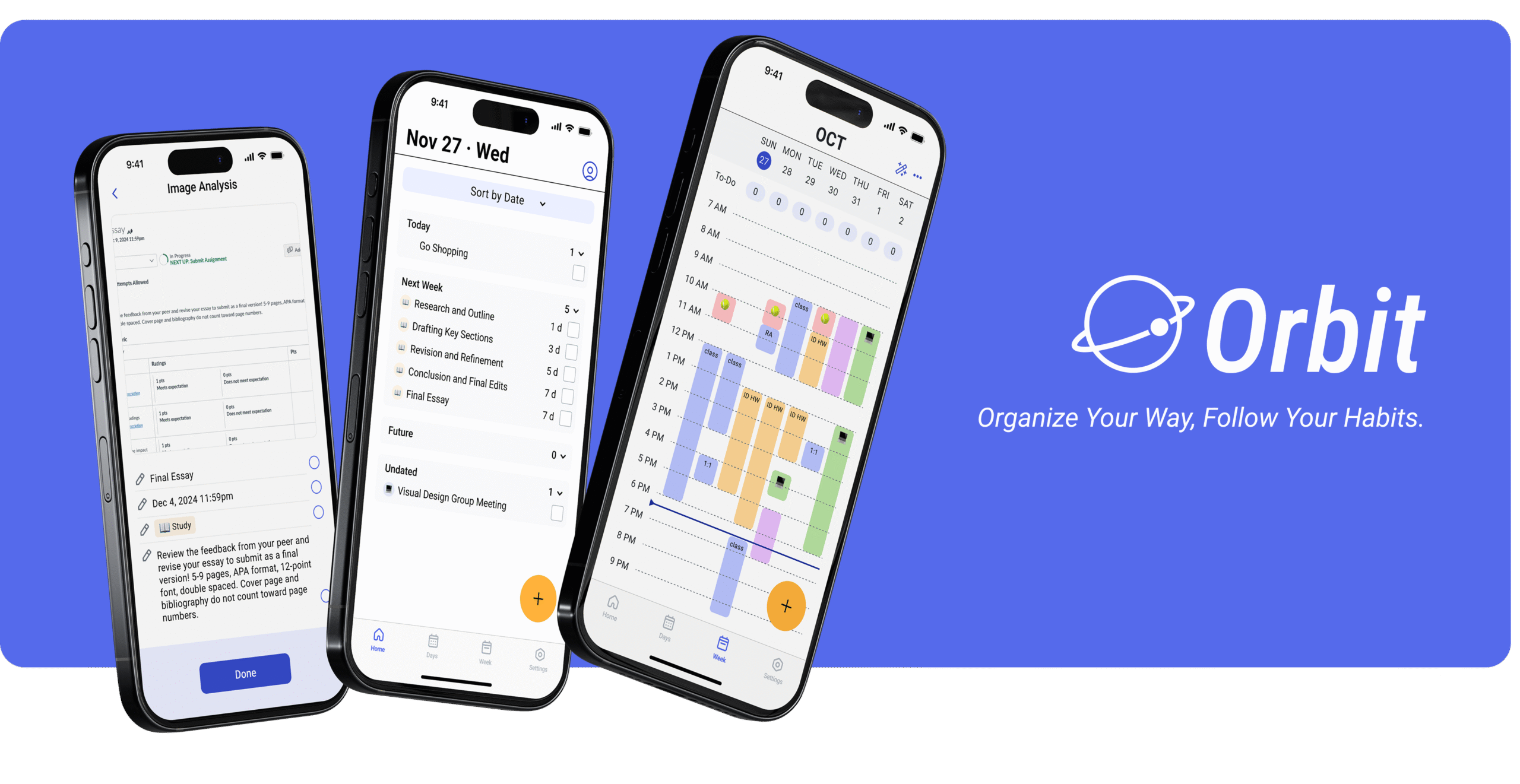
A UX research project investigating how users want to participate in AI decision-making — from single-task assistance to life-level scheduling agency.
80.3
SUS score, round 3
52.1%
Improvement R2 → R3
2
AI intervention levels studied
The question
University students manage tasks with real consequences — assignment deadlines, research timelines, part-time jobs running in parallel. We set out to design a task management app. But the harder question surfaced almost immediately:
AI can automate task creation entirely. How much should it actually do — and what does a user need to stay in control?
Should AI convert your lecture screenshot into tasks? Should it learn your energy patterns and schedule your week? Each question asks users to surrender a different kind of control, and requires a fundamentally different kind of trust.
Survey→
Interview→
KANO→
Brainstorm→
Design→
Concept Test→
UT Round 1→
UT Round 2→
UT Round 3
Foundation
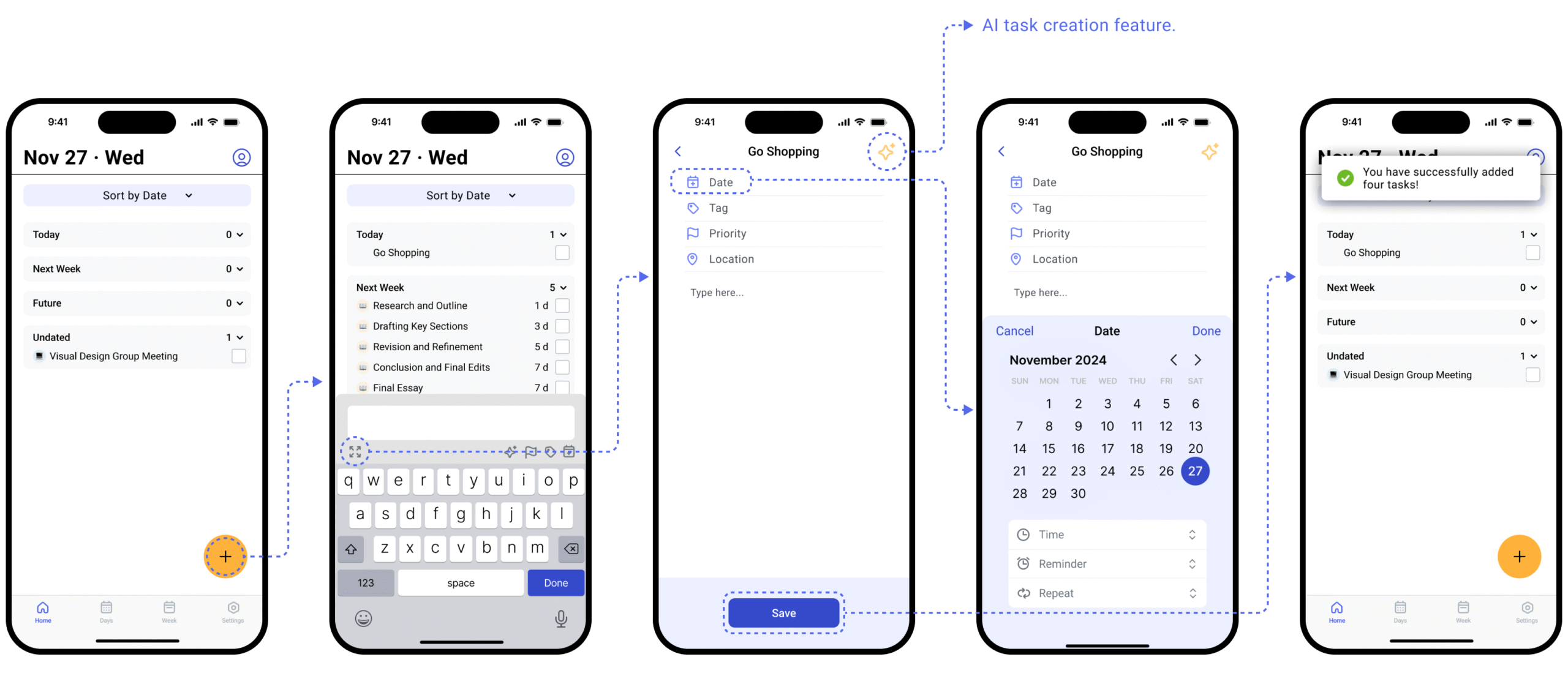
Before AI, the baseline: Manual Task Creation
We started with the core manual flow — how users add, organize, and manage tasks by hand. Even here, usability testing surfaced a consistent pattern: users needed the system to visibly confirm it had understood them. Clear save states, explicit feedback, no ambiguous outcomes.
This became the foundation for everything that followed. If users need that reassurance in a manual flow, they need it even more when AI is the one making inferences.
Level 1
Single-task AI assistance
We designed two AI features at this level. Both are triggered by the user, both produce a draft for review, and both require confirmation before anything is committed. The input method differs — one starts with an image, one starts with a goal — but the trust pattern is identical.
Feature A
Image Conversion into Tasks
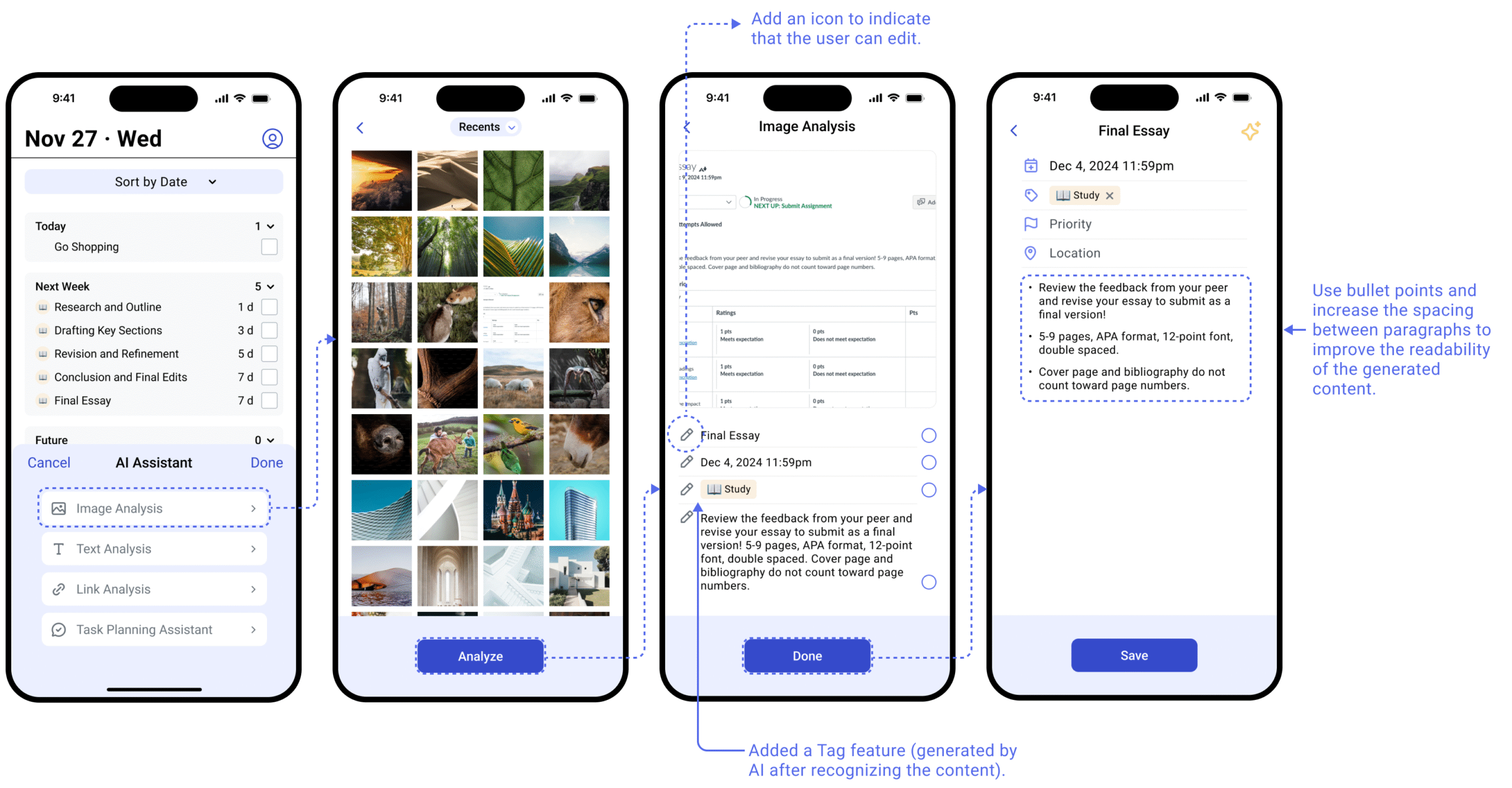
Users upload a screenshot or photo containing task information. AI extracts the content and presents a draft. One action, one output, one decision point.
Finding 1
AI is "attractive," not essential
KANO study (n=20): image-to-task conversion landed in the Attractive category — not Must-have. Users weren't depending on AI to function; they wanted it to eliminate friction they already resented.
Finding 2
Users need to see before committing
Early flow: upload → task created. Usability testing broke it immediately. Tasks carry deadlines that affect grades. Users needed a checkpoint before anything was committed.
Finding 3
AI structures, users interpret
Users wanted readable output but didn't want AI to rewrite their notes. Resolution: bullet points and paragraph breaks, original language preserved. AI formats, doesn't judge.
"AI should be an assistant, not the main brain."
Before — original flow
Upload image
↓
AI creates task directly
↓
Task committed
✗ No user checkpoint
After — redesigned flow
Upload image
↓
AI extracts & drafts
↓
User reviews & edits ← checkpoint
↓
Task confirmed
✓ AI acts, user confirms
Feature B
Task Breakdown Assistance
Users describe a long-term goal in natural language. AI generates a structured task plan with subtasks and suggested dates — a conversational flow modeled on familiar chat interfaces.
Usability testing confirmed the same pattern as Image Conversion: participants found the AI output genuinely useful, but immediately asked "Can I edit this?" The confirmation step wasn't optional. It was the minimum viable trust mechanism.
A secondary finding: users wanted the AI to support more diverse input methods — text, images, and documents — suggesting they saw this as a general-purpose task scaffolding tool, not just a text-only assistant.
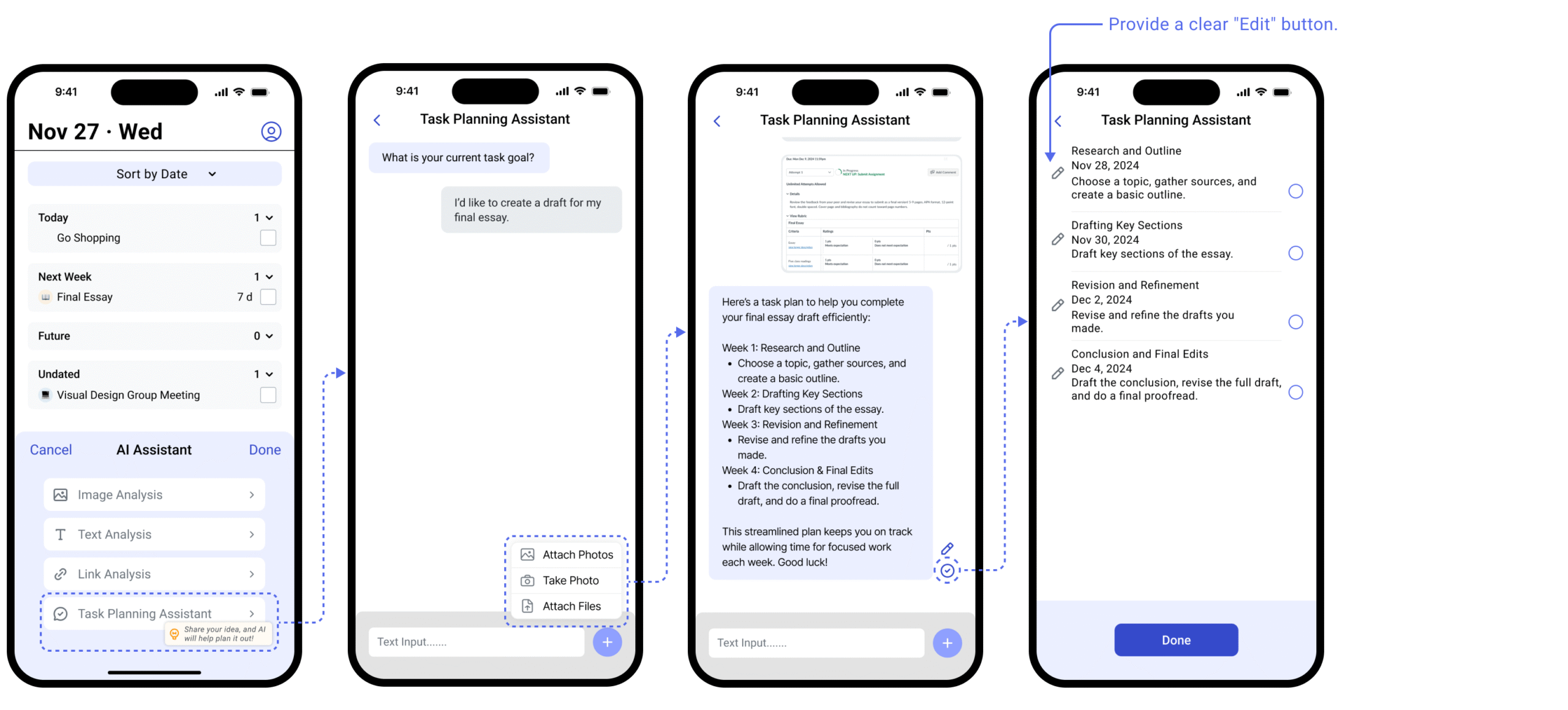
Shared design principle across both features: users trust AI to act — they need to retain authority to confirm. The two-step flow emerged independently from testing both features. It wasn't a design assumption. It was what users asked for.
Level 2
Persistent agency — Scheduling & Prioritizing
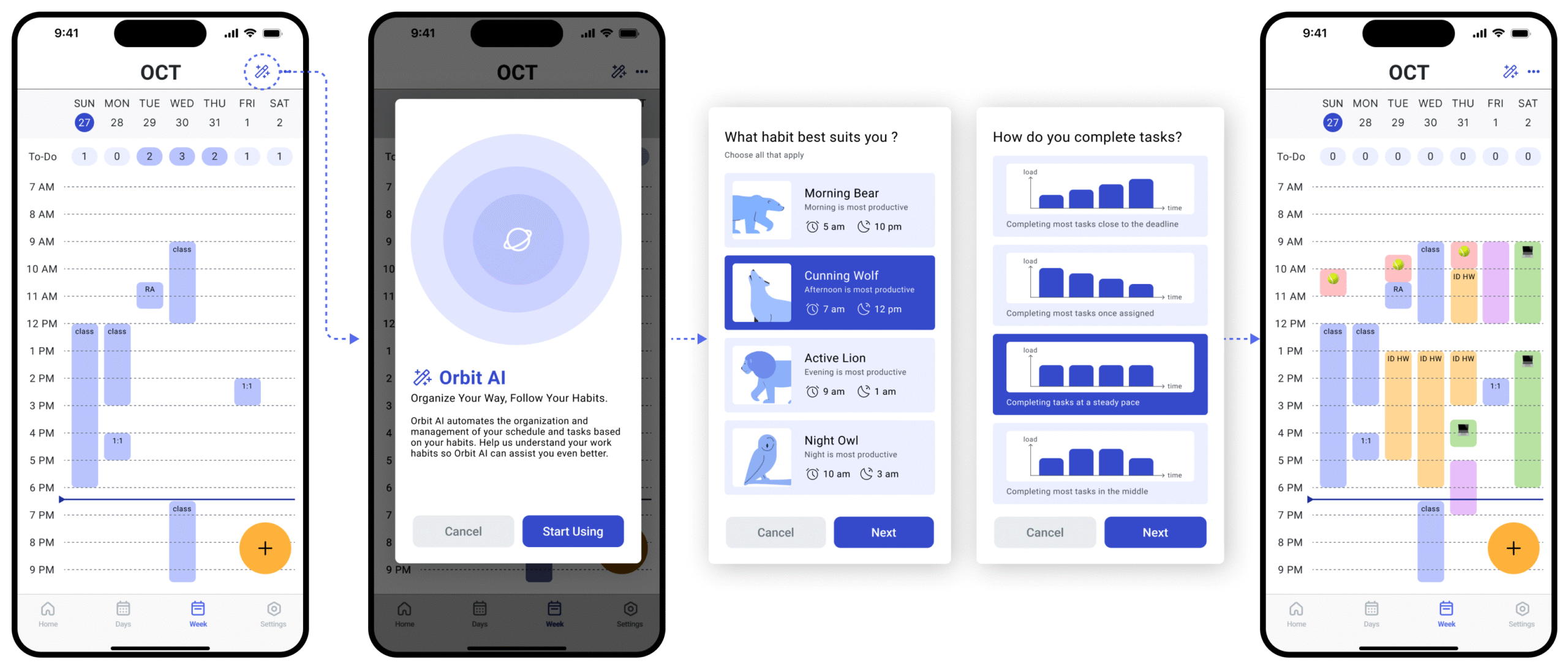
This is a different ask entirely. Not "help me with this one thing" — but "learn who I am and plan my life." At this level, a single confirmation step isn't enough. Trust must be built before AI ever acts.
1
Prior authorization — Habit Survey
Before AI acts on your behalf, it learns who you are. We reframed the survey from a data collection form into a trust ritual — explaining that this is how AI personalizes its recommendations. Positive reception followed immediately.
2
Transparent reasoning — visible AI scoring
AI sorting score (Task Completion Rate + Priority Score + Average Score Day) shown to users. Three scheduling modes let users choose what AI optimizes for — not just receive its output blindly.
3
Persistent override — drag to adjust
Even with personalized scheduling, users immediately wanted to drag and adjust time blocks. This wasn't failure correction — it was natural co-planning. AI proposes, user refines.
Core insight
Two levels of AI intervention — two trust strategies
The two levels require fundamentally different trust architectures. Level 1 is transactional — trust is built one interaction at a time. Level 2 is relational — trust must be established before AI ever acts.
Level 1 — Human-in-the-loop
Level 2 — Human-on-the-loop
Level 1 — Single-task assistance
AI does
Extracts, converts, drafts
When
On user trigger
Trust via
Confirmation + editable draft
Finding
Users trust AI to act — need to confirm
Level 2 — Persistent agency
AI does
Learns, schedules, prioritizes
When
Continuously, proactively
Trust via
Prior auth + transparency + override
Finding
Users trust AI to plan — need to understand why
The depth of AI intervention determines the architecture of trust required
At Level 1, trust is transactional — built moment by moment. At Level 2, trust is relational — built over time through transparency and demonstrated understanding. A confirmation step alone is insufficient when AI acts continuously.
Outcome
80.3
SUS score, final round
52.1%
Improvement R2 → R3
3
Rounds of usability testing
"AI should be an assistant, not the main brain. These features help summarize everything efficiently."
"I love the image conversion feature for its simplicity and forward-looking AI integration."
"The AI scheduling feature simplifies updating priorities, allowing seamless task reassignment."
Reflection
We ran this research in late 2024, before human-in-the-loop became standard vocabulary in AI product design. What we found empirically — that users need AI to act but not decide unilaterally, that trust architecture changes with AI autonomy level — is now foundational to how the industry designs agentic products.
The pattern has a name now. We found it from the users.